

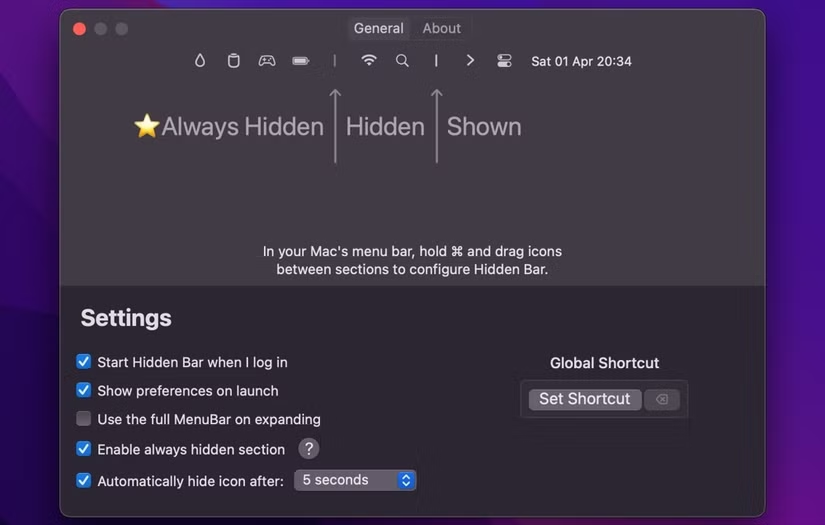
Hidden Bar for Mac is the lightweight menu bar manager that solves the cluttered menu bar problem in the most straightforward way possible without asking you to pay for it or configure a dozen settings before it does anything useful. Version 1.10 brings a more stable and refined experience for anyone
who has more menu bar icons than visible space and wants a clean and simple solution that just works from the moment you install it. I keep it running because a tidy menu bar is one of those small quality of life things that makes your Mac feel noticeably more organized every single day.
Hidden Bar Overview
Hidden Bar for Mac is a free and open source menu bar management utility that lets you hide icons you don’t need to see constantly behind a simple divider that you click to expand when you actually need access to them. It requires no complex configuration, no account, and no ongoing setup and works immediately after installation,
with a drag and drop interface for organizing which icons stay visible and which get tucked away. Hidden Bar for Mac is the most minimal and approachable solution to menu bar clutter available on macOS.
Key Features:
- Hide menu bar icons behind a collapsible divider
- Click to expand and reveal hidden icons instantly
- Drag and drop icon organization
- Keyboard shortcut to toggle hidden section
- Auto hide option after a set time
- Minimal resource usage in the background
- No configuration required for basic use
- Open source with active community development
- Works with virtually all menu bar apps
- Fully optimized for macOS Sequoia
What’s New in Version 1.10
- Improved icon detection and ordering stability
- Better compatibility with newer menu bar applications
- macOS Sequoia compatibility fully resolved
- Several bug fixes and stability improvements
System Requirements
- macOS 10.13 or later
- 2 GB RAM minimum
- 5 MB storage space available
- Intel or Apple Silicon Mac supported
How to Install Hidden Bar on Mac
- Download Hidden Bar 1.10 for Mac.
- Open the DMG file.
- Drag Hidden Bar to your Applications folder.
- Launch Hidden Bar for Mac.
- Drag icons on either side of the divider to organize your menu bar.
How to Download Hidden Bar for Mac
- Visit the official Hidden Bar GitHub page or Mac App Store.
- Click the Download button for the latest release.
- Wait for the DMG file to finish downloading.
- Open Downloads and open the DMG file.
- Drag to Applications and launch.
Supported Websites
- Hidden Bar GitHub Official Page
- Apple Mac App Store
- MacUpdate
- Softpedia
- Fosshub
- Filehorse
- 1000+ other trusted sources
Why Use Hidden Bar for Mac?
What makes Hidden Bar for Mac the easiest recommendation for anyone with a cluttered menu bar is how completely proportionate it is to the problem it solves. You install it, drag a few icons to the hidden side of the divider, and your menu bar is clean immediately without any further thought required. There are no profiles to manage, no premium features to unlock, and no configuration rabbit holes to disappear into.
The icons you need constantly stay visible and everything else is one click away when you actually need it. For anyone who eventually outgrows this minimal approach and wants finer control over icon spacing and behavior, Ice – Menu Bar Manager for Mac offers a more feature rich alternative built around the same core idea.
For anyone who wants a tidier menu bar without the overhead of a more feature heavy manager, Hidden Bar for Mac is genuinely the most sensible starting point.
Hidden Bar vs Other Menu Bar Managers
| Feature | Hidden Bar | Others |
|---|---|---|
| Zero Configuration Required | Yes | Limited |
| Completely Free and Open Source | Yes | No |
| Drag and Drop Organization | Yes | Limited |
| Keyboard Shortcut Toggle | Yes | Limited |
| Mac Optimized | Yes | No |








