

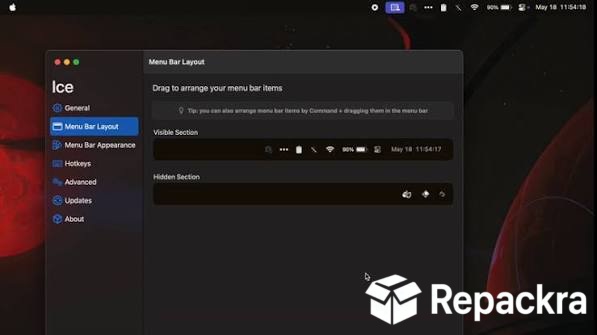
Ice for Mac is the menu bar management tool that finally solves the cluttered and overflowing menu bar problem that anyone with more than a handful of apps installed on their Mac knows all too well. Version 0.11.13 brings a more refined and reliable experience for anyone,
who wants a clean and organized menu bar without paying for a premium solution. I keep it running because a tidy menu bar is one of those small quality of life things that makes your Mac feel noticeably more pleasant to use every single day.
Mac power users who want to take that same efficiency focus further into their entire workflow will find Raycast Pro for Mac a natural companion, replacing Spotlight with a significantly more capable launcher that controls apps, runs automations, and surfaces integrations all from one fast keyboard driven interface.
Ice Overview
Ice for Mac is a lightweight and open source menu bar manager that lets you hide, show, and organize menu bar icons exactly the way you want them without any unnecessary complexity. It gives you hidden and always hidden sections that you can reveal with a click or a keyboard shortcut,
keeping your menu bar clean while still making every icon accessible when you actually need it. Ice for Mac does one thing and does it remarkably well.
Users who want to complete that same productivity focused Mac setup with proper thumbnail based window switching will find AltTab for Mac a natural addition, replacing macOS’s limited window switcher with a full Alt+Tab experience that lets you see and jump to every open window instantly.
Key Features:
- Hide and show menu bar icons with a single click
- Always hidden section for rarely needed icons
- Custom menu bar dividers for organization
- Keyboard shortcut to reveal hidden icons
- Auto hide options for cleaner appearance
- Menu bar appearance customization options
- Ice icon customization for personal preference
- Lightweight with minimal resource usage
- Open source with active development
- Fully optimized for macOS Sequoia
What’s New in Version 0.11.13
- Improved icon detection and ordering stability
- Better compatibility with newer menu bar apps
- macOS Sequoia compatibility fully resolved
- Several bug fixes and stability improvements
System Requirements
- macOS 13.0 or later
- 4 GB RAM minimum
- 20 MB storage space available
- Intel or Apple Silicon Mac supported
How to Install Ice on Mac
- Download Ice 0.11.13 for Mac.
- Open the DMG file.
- Drag Ice to your Applications folder.
- Launch Ice for Mac.
- Grant accessibility permissions and configure your hidden sections.
How to Download Ice for Mac
- Visit the official Ice GitHub page.
- Click the latest release download link.
- Wait for the DMG file to finish downloading.
- Open Downloads and open the DMG file.
- Drag to Applications and launch.
Supported Websites
- Ice GitHub Official Page
- MacUpdate
- Softpedia
- Fosshub
- Filehorse
- Homebrew Package Manager
- 1000+ other trusted sources
Why Use Ice for Mac?
The honest reason Ice for Mac is worth installing is how immediately it improves the experience of looking at your Mac’s menu bar. Every app you install adds another icon up there and after a while it becomes a cluttered strip of icons you never look at that eats into the space your menu bar actually needs to function.
Ice for Mac pushes everything you don’t need to see constantly into a hidden section that’s always one click away when you do need it. The fact that it’s open source and genuinely lightweight means you’re not adding another heavy utility to manage the utilities you’re already running.
Mac power users who want quick access to hidden system settings and macOS tweaks right alongside their other menu bar tools will find Almighty for Mac a perfect companion, putting dock behavior, screenshot controls, and cache clearing in the menu bar without any digging through System Settings.
Ice vs Other Menu Bar Managers
| Feature | Ice | Others |
|---|---|---|
| Always Hidden Section | Yes | Limited |
| Open Source | Yes | No |
| Custom Dividers | Yes | Limited |
| Lightweight Resource Usage | Yes | Limited |
| Mac Optimized | Yes | No |








