

UniGetUI for PC is the package manager frontend that makes installing, updating, and managing software on Windows feel as smooth and organized as it should have always been. Version 2026.2.2 brings a more polished and capable experience for anyone tired of manually hunting down installers and checking for updates across dozens of different apps.
I use it regularly because having every piece of software on my machine manageable from one clean interface saves a genuinely surprising amount of time.
UniGetUI Overview
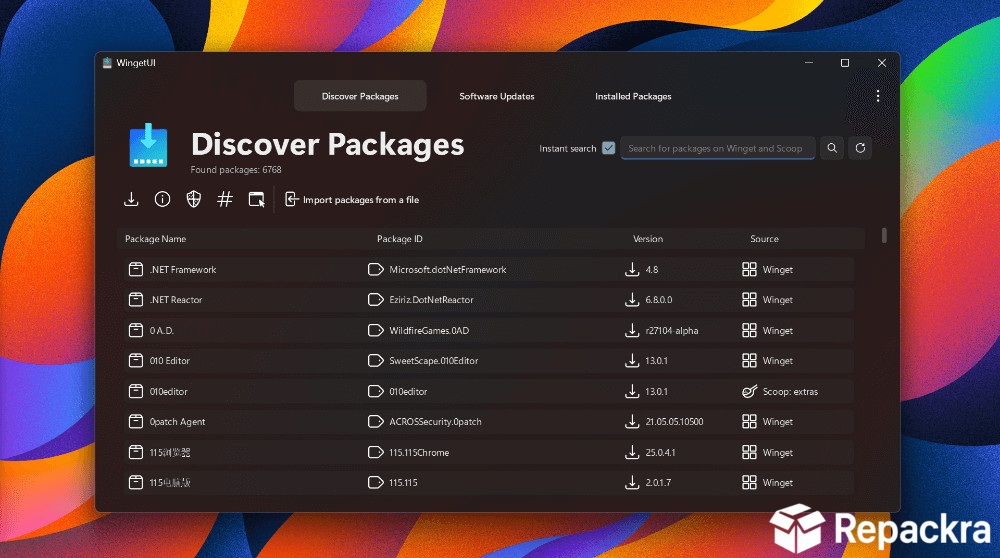
UniGetUI for PC is a graphical frontend for multiple Windows package managers including Winget, Scoop, Chocolatey, and pip, bringing them all together under one unified and easy to navigate interface. Instead of running terminal commands or visiting individual websites for every app update,
UniGetUI for PC lets you discover, install, and update software from a single organized dashboard. It makes package management accessible to everyone, not just people comfortable with the command line.
Power users who want to go deeper than a GUI and automate software management, system tasks, and deployment workflows from the terminal will find PowerShell for Windows the most capable shell for the job, giving them object based scripting and full system access that complements what UniGetUI handles visually.
Users who prefer working directly from the command line for package installs rather than a full shell scripting environment will find Chocolatey CLI for PC a natural companion, giving terminal focused users the same package source UniGetUI already pulls from, just without the graphical layer.
Key Features
- Unified frontend for Winget, Scoop, Chocolatey, and pip
- Browse and install software from multiple package sources
- One click bulk updates for all installed packages
- Scheduled automatic update checks
- Package ignore list for version locking specific apps
- Export and import software lists for easy PC setup
- Detailed package information and version history
- Dark mode and light mode support
- Notification system for available updates
- Fully optimized for Windows 10 and Windows 11
What’s New in Version 2026.2.2
- Improved Winget and Scoop source compatibility
- Faster package search and loading performance
- Better bulk update reliability across multiple sources
- Several bug fixes and stability improvements
System Requirements
- Windows 10 or later, 64-bit
- 4 GB RAM minimum
- 200 MB storage space available
- Active internet connection required
- Intel or AMD dual core processor
How to Install UniGetUI on PC
- Download UniGetUI 2026.2.2 for PC.
- Run the installer file.
- Follow the on screen installation steps.
- Launch UniGetUI for PC.
- Let it detect your installed package managers and start managing software.
How to Download UniGetUI for PC
- Visit the official UniGetUI GitHub page.
- Click the download link for the latest Windows release.
- Wait for the installer to finish downloading.
- Open Downloads and run the installer.
- Follow the setup steps to complete installation.
Supported Websites
- UniGetUI GitHub Official Page
- Microsoft Store
- Softpedia
- MajorGeeks
- FileHippo
- Fosshub
- 1000+ other trusted sources
Why Use UniGetUI for PC?
What makes UniGetUI for PC genuinely useful in a daily workflow is how much time it saves the moment you need to set up a new machine or keep an existing one updated. Instead of visiting ten different websites, downloading ten different installers, and running through ten different setup wizards, you just search, click install, and move on.
The bulk update feature is particularly satisfying since seeing every outdated app on your system listed in one place and updating them all in a single click is the kind of convenience that’s hard to go back to doing the old way.
IT admins managing multiple machines who need to keep third party apps patched automatically across an entire fleet rather than one PC at a time will find Patch My PC for PC a more enterprise focused companion, handling update deployment at a scale UniGetUI isn’t designed for.
For anyone who manages their own PC or helps others keep their software current, UniGetUI for PC is one of those tools that immediately earns its place.
UniGetUI vs Other Software Managers
| Feature | UniGetUI | Others |
|---|---|---|
| Multi Package Manager Support | Yes | Limited |
| Bulk One Click Updates | Yes | Limited |
| Software List Export and Import | Yes | No |
| Version Locking Support | Yes | Limited |
| Windows Optimized | Yes | No |








